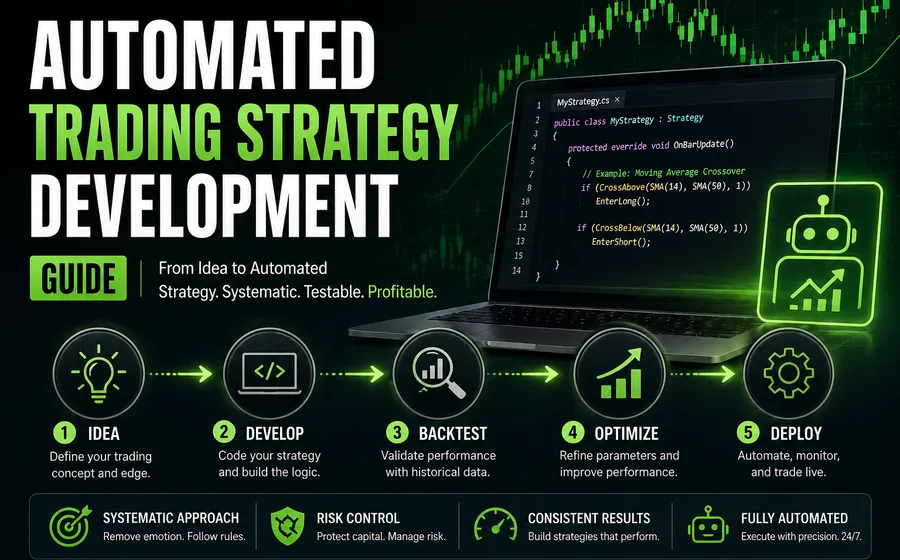
Automated trading strategy development is not just coding entries and exits. A usable strategy needs rules, market assumptions, testing, order handling, deployment planning, and clear limits around what the software should and should not do.
This guide explains how to approach strategy development before requesting a quote or buying a tool.
The same discipline applies to agentic trading. A trading agent needs a defined job, approved tools, data boundaries, review points, and escalation rules before it should be trusted with a workflow. If the project needs an agent around an existing strategy, read the agentic trading software scope checklist alongside this guide.
Define the trading behavior first
The first version of a strategy should be described in plain English before it is coded.
Define:
- What market or instrument the strategy is for.
- What data the strategy needs.
- Entry conditions.
- Exit conditions.
- Stop and target behavior.
- Position sizing.
- Session rules.
- Whether the strategy should trade long, short, or both.
- Whether it should pause, flatten, or stop after certain events.
If the behavior cannot be explained clearly, it will be difficult to build and harder to test.
Choose the right platform
Platform choice affects everything. A strategy inside NinjaTrader is different from a TradeStation strategy, a MetaTrader EA, a TradingView alert workflow, a MultiCharts strategy, or an external TWS API application.
Start with the trading platform programming guide if you are still deciding where the strategy belongs.
For NinjaTrader-specific automation, read the NinjaTrader automated trading guide or review NinjaTrader programming services.
Backtesting is only one layer
Backtesting is useful, but it does not prove that a strategy is ready for live use.
A practical testing process may include:
- Code-level verification of rules.
- Historical backtests.
- Walk-forward or parameter sensitivity checks when appropriate.
- Market Replay.
- Simulation testing.
- Small controlled live testing.
- Logs for entries, exits, errors, and order state changes.
Each layer answers a different question. A backtest can show whether historical rules fired. It does not fully answer live order behavior, slippage, connection handling, or account synchronization.
Order handling needs its own scope
Many strategy ideas focus on signals. The harder part is often order behavior.
Define:
- Market, limit, stop-market, or stop-limit order usage.
- How stops and targets are submitted.
- Whether orders are linked with OCO behavior.
- What happens if an order is rejected.
- What happens after a partial fill.
- Whether the strategy can scale in or out.
- Whether the trader can manually intervene.
- How the strategy recovers after a platform reload.
Order handling is where vague automation projects become expensive. It is better to define these rules early.
Agentic workflows need permission boundaries
Agentic trading projects add a different kind of scope question: what is the agent allowed to see and do?
Define:
- Which data sources the agent can read.
- Which APIs, files, dashboards, or platform tools it can call.
- Whether it can place orders, stage orders, or only prepare recommendations.
- When it must ask for human approval.
- What it should log for audit and support.
- What it should do after missing data, disconnections, rejected orders, or conflicting signals.
- Which actions are explicitly blocked.
A good first version often focuses on monitoring, reporting, alerts, and staged actions. Direct execution should only be considered after the workflow, permissions, and failure behavior are defined.
Avoid optimizing before the workflow is stable
Optimization can be useful, but only after the base behavior is correct. If the strategy rules are still changing, optimization often creates noise instead of clarity.
Before optimizing, confirm:
- The signals are coded correctly.
- The data series and bar type are correct.
- The strategy handles order states properly.
- The test period makes sense.
- Inputs have practical ranges.
- Results are not based on one narrow historical fit.
Optimization should support decision-making. It should not replace a coherent strategy.
When custom software makes sense
Some automated trading projects outgrow platform scripting. Custom software may make sense when the workflow needs:
- A custom UI.
- Account or portfolio-level monitoring.
- Database storage.
- External API integrations.
- Custom reporting.
- Licensing or user management.
- Multi-platform coordination.
- File import/export or data pipelines.
- Agentic monitoring, reporting, or tool orchestration.
For those projects, start with custom trading software or agentic trading software rather than forcing everything into a single chart script.
What to send before requesting a quote
Send:
- Plain-English rules.
- Screenshots or screen recordings.
- Existing code if available.
- The platform and version.
- Example trades.
- Desired inputs and outputs.
- Order-handling expectations.
- Testing expectations.
For early-stage ideas, start with consulting to turn the concept into a buildable scope. If the platform and workflow are already clear, request a quote from the matching service page.