
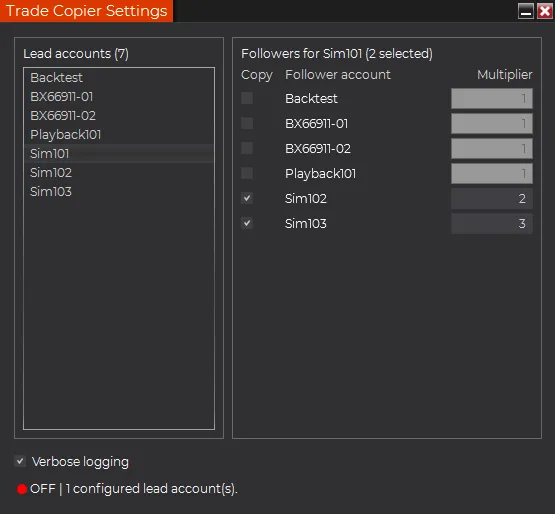
A NinjaTrader trade copier is useful only if it matches the way you actually route orders. Copying a simple market order is not enough for many traders. The workflow usually needs lead accounts, follower accounts, sizing rules, stop and limit behavior, and a clear way to pause copying when the setup changes.
Moore Tech offers a ready-made Trade Copier Add-on for traders who want order copying across multiple NinjaTrader accounts without starting from a custom build.
Fast decision: review the ready-made product when you need defined lead/follower mappings, quantity multipliers, and stop, limit, and market order copying. Request custom scope when account allocation or risk logic is materially different.
What to check before buying a trade copier
Before using a trade copier with real money, confirm:
- whether it supports multiple lead and follower accounts
- whether follower sizing can use multipliers
- how market, limit, and stop orders are copied
- whether order changes and cancellations stay synchronized
- what happens after a platform disconnect or workspace reload
- how quickly you can disable copying if the setup is wrong
The riskiest trade copier is the one that looks simple but hides these details until live use.
Multiple accounts need clear sizing rules
Copying one lead account into one follower account is the easy case. Multiple accounts create a different problem: each follower may need different size, risk, or account-specific behavior.
If the copier supports a multiplier, a single lead order can become proportionally sized follower orders. That keeps the setup more flexible than forcing every account to trade the same quantity.
Stop and limit order behavior matters
Many traders search for a copier because they do not want to rebuild the same entry, stop, and target across accounts by hand. That means order type support matters.
If your workflow uses stop or limit orders, ask whether the copier only mirrors fills or whether it can copy the orders themselves. That difference changes how close the follower accounts stay to the lead account.
When custom development still makes sense
A ready-made copier is the fastest path when the workflow matches the product. Custom development makes more sense when you need unusual allocation logic, account grouping, risk caps, proprietary UI, broker-specific behavior, or integration with another tool.
Start with the Trade Copier Add-on if you need a direct product path. If you need account logic that goes beyond the product, request a NinjaTrader programming quote.
Pre-purchase simulation checklist
Do not validate a copier with a single market order. Test the workflow you expect to use:
- Map every lead and follower account deliberately.
- Confirm each follower multiplier using small simulation quantities.
- Submit, modify, and cancel market, limit, and stop orders.
- Check behavior after a partial fill, rejected order, disconnect, and workspace reload.
- Confirm how you pause copying and reconcile account positions.
The ready-made add-on is not the right fit when you need broker-independent copying, portfolio-level allocation, proprietary risk caps, or behavior outside the documented NinjaTrader workflow. Those requirements need a scoped build or integration review.
Review Trade Copier pricing and product details or request a product-fit review before purchasing.
Related product path
The Chart Context Bundle is a separate workflow for traders improving chart context. For order-copying needs, start with the Trade Copier product page first.